
How do you actually compose with microtones?
How do you actually hear microtones? How do you actually conceive of them? Here's how I put them in a cogent way in my own workflow as a composer, so I can play around with basically any microtone that I want.
 By Saad Haddad, composer
Here's the video this post comes from (12 minutes), or you can read it below.
- Be away from the notation software
- Hear the microtone, in cents
- Draw out a tuning system like a painter
- Give each microtonal tuning its own track
- Hear how the microtones are shifting over time
- Why I model microtones on a piano
1. Be away from the notation software
I write with a lot of microtones. I write thinking about pitch in a different way than just the 12 notes on the piano.
When I made the video, I was working on a piece for the Imani Winds. To do this, I like to play around a little bit on the computer, and I like to be away from the notation software. So I like to be in a station where I have my second screen, my keyboard, and my pencil and paper.
I like to be away from it
Where I like to be
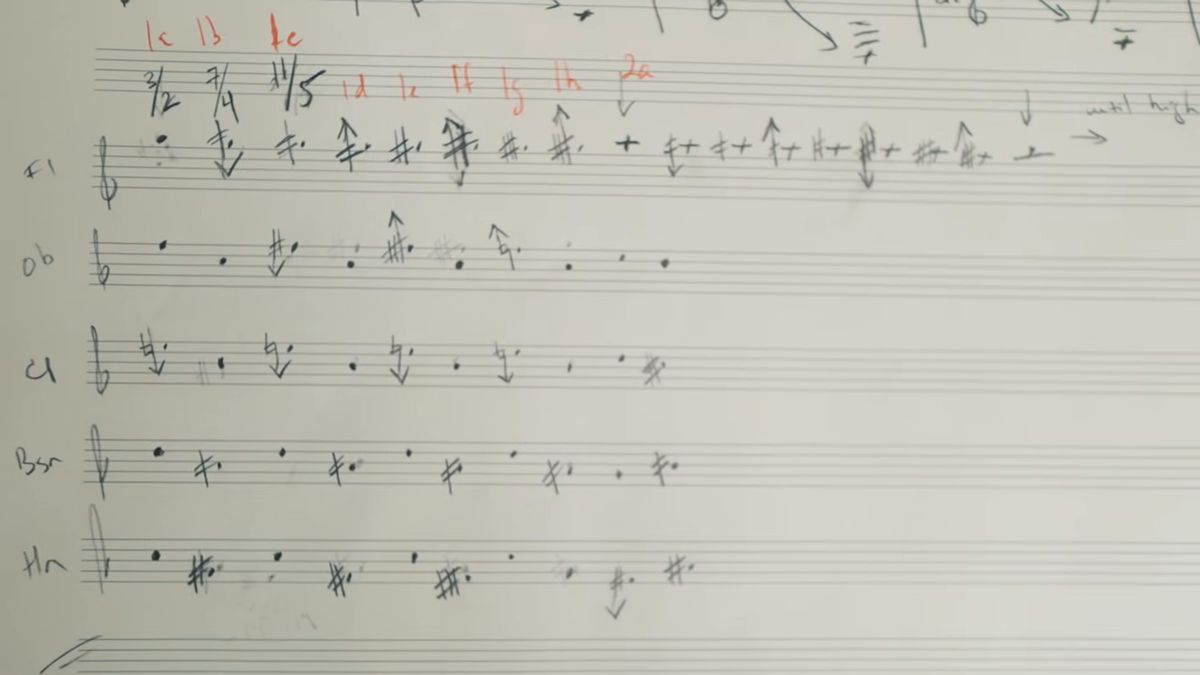
So what am I going to use to actually model these microtones? The software I used is Pianoteq. I'm not being sponsored or anything by them. I just really love this program.
They didn't actually sample every key of a real acoustic piano to get this instrument. They modeled it electronically. It sounds very similar to what a real piano sounds like, and you can tinker with it a lot more, including the tuning of it.
2. Hear the microtone, in cents
Equal temperament is just dividing the octave into 12 equally spaced intervals. That's basically a chromatic scale. But what happens if I want to hear something slightly different?
What I actually use when I'm composing is the detune function.
Let's say that I want the E natural right in the middle of the keyboard to be about 1 quarter tone down. I take that pitch and drag it down to minus 50 cents. Put it back to the zero level, and it's an E natural. Put it at plus 50, and it's an E quarter sharp. You can really hear the difference there.
If you want something a little bit more nuanced, you can do an E 8th tone sharp, which would be plus 25 cents. And if I want E minus an 8th tone, I'll go to minus 25.
3. Draw out a tuning system like a painter
Let's say I don't really know what tuning schema I want to use. I can actually just draw it out.
It's just really fun, because then you can get things that are really crazy. It's an amazing way to draw out, like a painter, what kind of tuning you want to have in your piece.
4. Give each microtonal tuning its own track
Here's how I use this in real life. I had my Logic Pro session populated with flutes, oboes, a clarinet track, 2 bassoon tracks and 2 horn tracks. Each one of these tracks is differentiated by its microtonal tuning, and I can open up Pianoteq right in Logic.
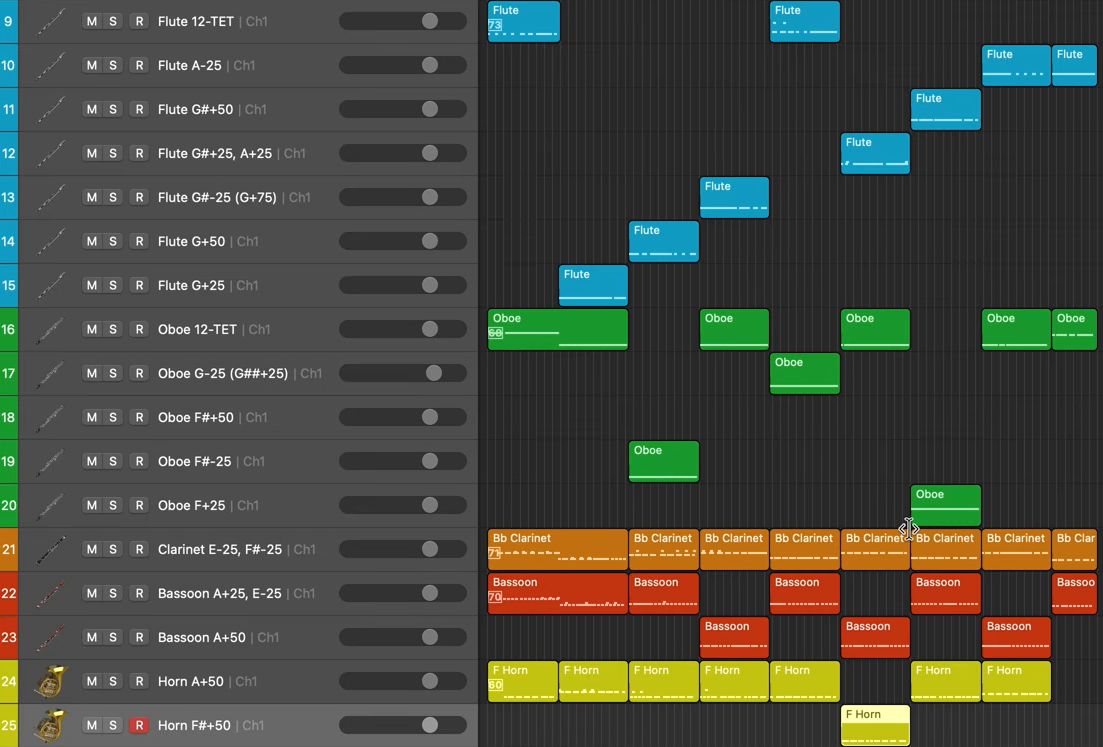
The first track was flute 12-TET, in other words a normal 12-note standard equal temperament.
But I had another note where I wanted an A to be down 25 cents, or an 8th of a tone, and that happens later on in the piece. This gets its own track, because I don't want other A's in the piece to be down 25 cents. I just want that A in that particular part of the piece to be down 25 cents.
- 1A bunch of A'sI want them to be down an 8th tone.
- ?Other A's in the piece?I don't want those to be down 25 cents.
- 2It gets its own trackJust that A, in that particular part of the piece.
When I played a G sharp and then the A that's minus 25 cents, you could really hear the difference. And it's modeled into Logic, which I think is a lot easier to work with than going through a notation software.
I did all of this for all the different tracks, every time I knew there was going to be an individual pitch that's needed. If I had pitches that were G sharp plus 50 cents, I knew which track they go on.
5. Hear how the microtones are shifting over time
The introduction of this piece would be impossible to hear, in my opinion, if you're just working on a notation software program, or if you're just doing it by ear.
I want to hear how these different microtones are interacting with each other throughout a time-based temperament.
- Hearing the chord itself
- How these microtones are interacting with each other
- How these microtones are shifting
6. Why I model microtones on a piano
There's a difference between me modeling these notes onto a piano, with really distinct microtonal intervals, and hearing what the sampled instruments sound like in my Sibelius file. To me, I really prefer the piano, for 2 reasons.
Number 1, it removes the timbre of the instruments out of the way, so I can just focus on the pitches.
Number 2 is the microtone playback. In my Sibelius file, I didn't even have microtones in the playback at all. I just had the normal 12-TET pitches.
So of course it was impossible for me to figure out what the harmonies were like, because I wasn't hearing them at all. The pacing, yes, I was hearing it, but I might as well hear it modeled properly in Logic with Pianoteq.
Impossible for me to figure out what the harmonies were like
I can just focus on the pitches
At least for me, this frees up my mind completely to play around with basically any microtone that I want. And I can improvise quite easily on the keyboard with Pianoteq open on my second monitor.
I'm not limited to any one scheme. I can just go freely where my mind wants.
What to do next
Once you can hear the microtones you want, use my free guide to composing any piece in 4 steps.